JASP Articles
Data Analysis | Regression
Selecting the Analysis
-
First, enter data involving multiple variables (described elsewhere).
-
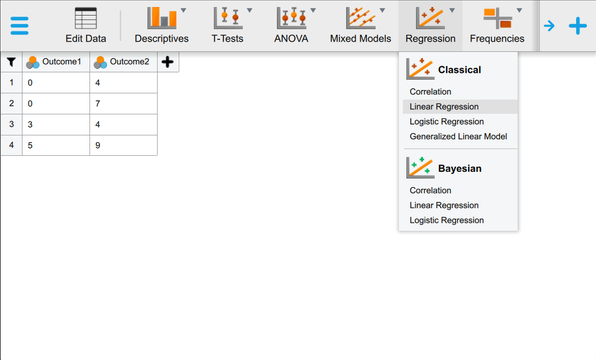
In the “Analyses” section of the menu, select the “Regression -> Linear Regression” option (from the “Classical” section).
Obtaining Inferential Statistics
-
A set of options will then appear for you to choose the variables and statistics of interest.
-
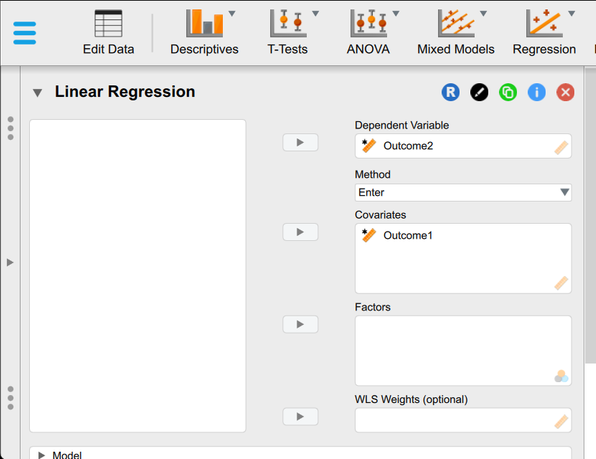
Select the variables you wish to analyze by clicking on them in the left-hand box and then the arrow to move them into the right-hand boxes. Your Predictor (here “Outcome1”) should go under “Covariates” and your Outcome (here “Outcome2”) should go in as the “Dependent Variable”.
-
Output (with no descriptive statistics) will automatically appear on the right side of the window.
Obtaining Additional Statistics
-
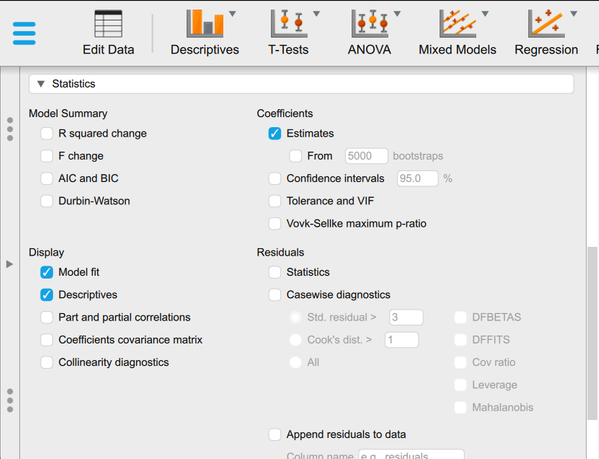
Scroll down to the section on “Statistics”. Check “Display -> Descriptives” and “Coefficients -> Estimates”.
-
Updated output will automatically appear on the right side of the window.